People searching for RuView motion capture usually want to know whether WiFi signals can track body movement without a camera. The short answer is: WiFi CSI can reveal motion patterns, and research systems such as WiFi DensePose show why the idea is plausible, but a practical RuView-style setup still needs controlled hardware, repeated trials, room baselines, and honest uncertainty.
This page sits between the RuView online demo, the GitHub setup guide, and the ESP32 CSI hardware guide. It does not replace those pages. Instead, it explains the motion-capture layer: what a CSI stream can say about movement, how pose-like confidence should be interpreted, and how to avoid mistaking a clean demo for a validated sensing system.
What RuView Motion Capture Means
RuView motion capture does not mean that WiFi produces a normal video skeleton. It means the system observes how radio paths change when a person moves through a room, then uses signal processing and AI models to infer motion states, presence, gesture patterns, or pose-related clues. The result can be useful, but it is probabilistic and environment-dependent.
A camera sees pixels. WiFi CSI sees changes in multipath propagation. Walls, furniture, antenna orientation, packet timing, body position, and other people in the room all affect the measurement. That is why a reliable workflow treats motion capture as a sensing experiment, not a plug-and-play webcam replacement.
- Use the term motion capture for movement inference, not guaranteed full-body tracking.
- Keep baseline, calibration, and confidence visible beside any output.
- Treat pose, breathing, fall, and health-adjacent claims as research signals until independently validated.
Where WiFi DensePose Fits
WiFi DensePose is the search phrase many users associate with dense human pose estimation from wireless signals. It is useful context because it shows the direction of the research: WiFi features can sometimes be mapped to body-related representations when the environment, hardware, data, and model are controlled.
For a RuView user, the important lesson is not that every room can become a camera. The useful lesson is that CSI contains richer structure than RSSI. If you want pose-like output, you need more than a single strength number: you need repeatable CSI capture, synchronized or stable links, labeled scenarios, filtering, model evaluation, and negative tests where no meaningful movement occurs.
| Layer | What it handles | Common failure mode |
|---|---|---|
| CSI capture | Subcarrier-level channel changes from WiFi packets | Hardware exposes only RSSI or unstable packet timing |
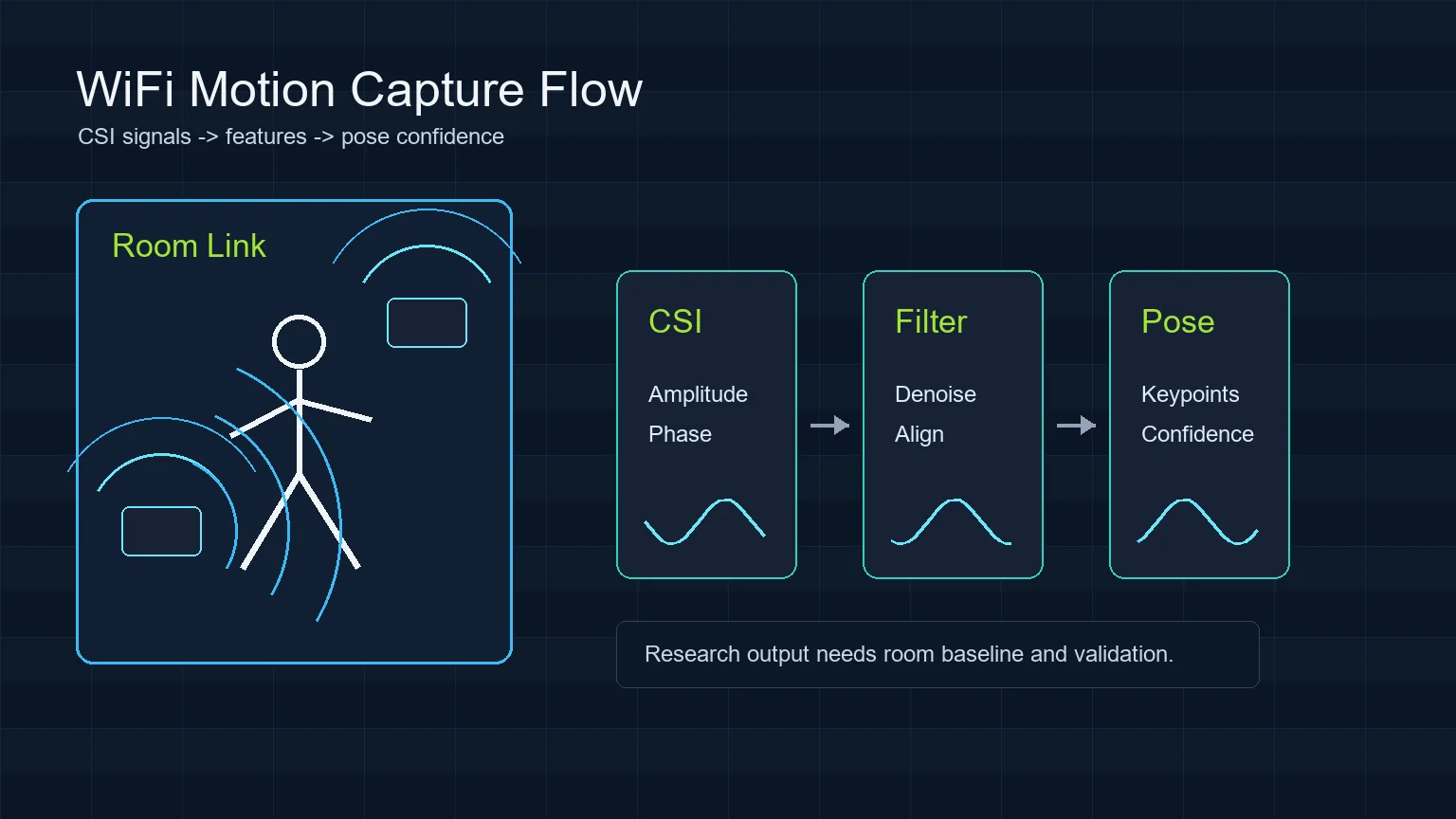
| Feature processing | Denoising, alignment, amplitude and phase-derived features | Room change looks like human motion |
| Model interpretation | Presence, gesture, keypoint, or pose confidence | Confidence is mistaken for ground truth |
| Validation | Baseline, labels, repeated trials, false-positive checks | Demo succeeds once but cannot be reproduced |
A Practical RuView Motion Capture Workflow
Start with a narrow question. Occupied versus empty is easier than full pose. Walking across a known link is easier than multi-person tracking. Hand movement near an antenna is easier than breathing across a large room. A good RuView experiment picks one question, records the room when nothing happens, then repeats the same action enough times to see whether the signal is stable.
After capture, clean malformed rows, align timestamps, separate amplitude and phase-derived features, and compare the trial against the empty-room baseline. Only then should you show an interpretation layer such as motion state, skeleton confidence, or activity label. The page or demo should keep limits visible so viewers understand what the model can and cannot claim.
- Define one scenario before collecting data.
- Record empty-room, door-movement, and no-person false-positive trials.
- Keep hardware placement, WiFi channel, packet rate, and room layout in the experiment notes.
Hardware and Setup Choices
A simple ESP32 CSI setup can teach the signal pipeline, but it may not be enough for pose-like motion capture. For presence or repeated movement tests, one receiver and a stable transmitter can be useful. For stronger localization or pose inference, multiple links, controlled traffic, careful antenna placement, and more robust labels become important.
Users should separate software setup from sensing setup. First confirm the hosted RuView demo or local repository path works. Then confirm the hardware can expose CSI. Finally, run repeatable room trials. Skipping this order makes debugging harder because UI issues, driver limits, and sensing errors get mixed together.
| Goal | Reasonable starting point | What to verify |
|---|---|---|
| Learn the interface | RuView online demo | Page loads and explains limitations |
| Inspect code | ruvnet/RuView GitHub repository | README, issues, setup path, current status |
| Capture simple motion | ESP32 CSI or compatible WiFi CSI hardware | CSI rows, timestamps, packet stability |
| Study pose-like output | Multiple controlled links and labeled trials | Reproducibility, false positives, confidence calibration |
How to Validate WiFi Motion Capture
Validation is the part that protects the user from overreading the demo. For each scenario, collect a baseline, run repeated positive trials, and run negative trials where similar environmental changes occur without the target action. Door movement, a chair moving, a laptop waking up, router traffic bursts, and a second person walking behind the link can all create confusing signal changes.
A responsible result report should show what was tested, how many repeats were run, what failed, and where confidence dropped. If a motion label appears only in one room, with one antenna position, and without negative tests, describe it as a demo observation rather than a general capability.
- Use repeated trials, not a single successful screen.
- Document room layout, sensor placement, people count, and WiFi settings.
- Compare pose or vital-sign claims with independent references before relying on them.
Common Misunderstandings to Avoid
The phrase WiFi see through walls often creates unrealistic expectations. WiFi sensing can be affected by movement beyond a direct line of sight, but that does not mean it gives a clear visual view through walls. Another misunderstanding is that GitHub availability proves a system is production-ready. Open-source code is useful for inspection and learning, but deployment still requires validation.
The strongest RuView content makes the boundary explicit: the homepage is for the online demo, the GitHub guide is for repository and setup checks, the ESP32 CSI guide is for hardware capture, and this page is for the motion-capture interpretation workflow. Keeping those boundaries clear helps searchers find the right page and reduces cannibalization between topics.
- Do not call RSSI-only changes dense pose.
- Do not present generated visuals as real sensing screenshots.
- Do not use WiFi motion capture for medical, security, or safety decisions without independent validation.
Sources and Technical References
RuView Motion Capture FAQ
Can RuView track a full body like a camera?
Not in the same way as a camera. A RuView-style WiFi workflow can infer motion or pose-related clues from CSI changes, but output depends on hardware, room layout, calibration, model quality, and validation.
Is WiFi DensePose the same as RuView?
No. WiFi DensePose describes a research direction for estimating body pose from WiFi signals. RuView is an open-source WiFi sensing project and demo gateway that can help users explore related ideas and workflows.
What is the easiest first experiment?
Start with occupied versus empty or a repeated walk across a known transmitter-receiver link. Full pose, breathing, or multi-person tracking should come later after the signal pipeline is stable.
Can WiFi motion capture see through walls?
WiFi signals can be affected by movement beyond direct line of sight, but that is not the same as a clear visual view through walls. Treat through-wall claims as experimental and context-specific.