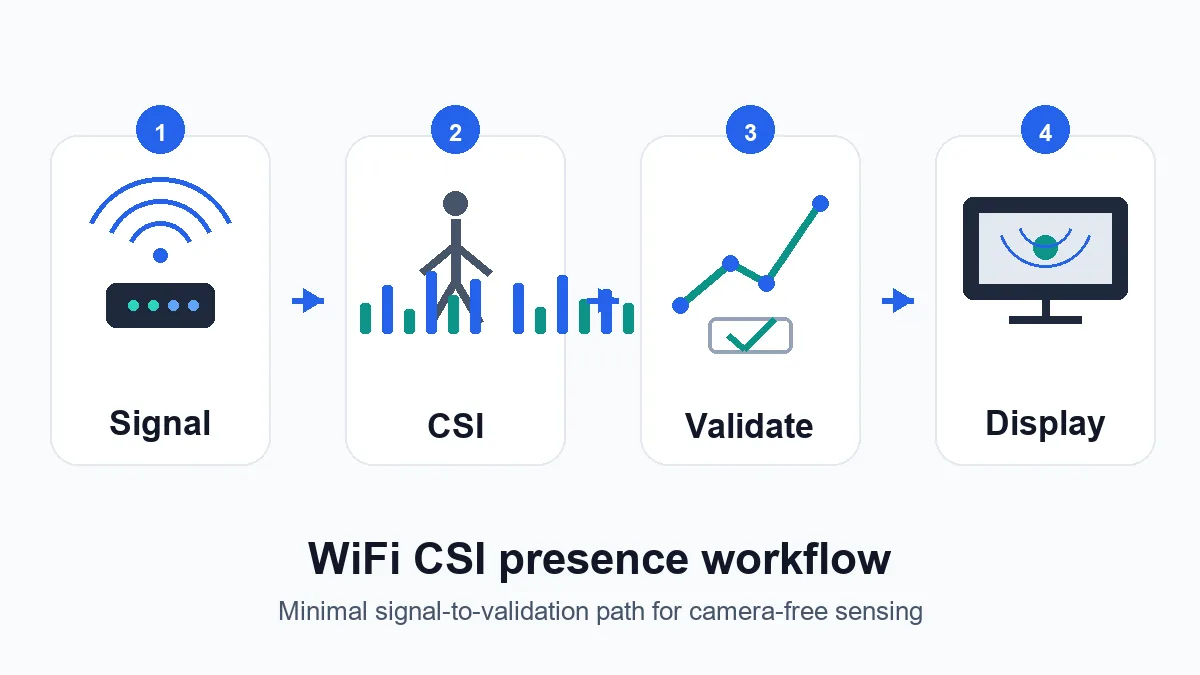
What WiFi human detection actually detects
A WiFi link sends radio waves through a room. Walls, furniture, appliances, and bodies reflect and absorb parts of that signal. CSI records fine-grained changes across subcarriers, so a person walking, breathing, sitting down, or blocking a path can create a measurable pattern. The system does not literally see a person; it detects changes in a radio channel and infers a state from those changes.
That distinction matters for searchers comparing WiFi human detection GitHub projects. A presence detector may answer occupied versus empty. A motion detector may answer moving versus still. A tracking or pose system tries to infer richer geometry, often with stricter hardware, calibration, and training data requirements.
- Presence detection: estimates whether a room or zone is occupied.
- Motion detection: reacts to channel changes caused by movement.
- Human recognition: tries to classify activity, posture, or person-related patterns.
- RuView display: presents confidence, limitations, and links to the sensing stack rather than replacing validation.
CSI versus RSSI for human detection
Many simple WiFi experiments start with RSSI because it is easy to read. RSSI is useful for broad signal strength changes, but it compresses too much detail for robust human detection. CSI provides a richer picture of how each subcarrier changes over time, which is why most serious WiFi sensing research and ESP32 CSI projects focus on CSI capture.
The tradeoff is complexity. CSI requires compatible hardware, careful packet collection, preprocessing, labels, and repeatable test conditions. A RuView-style result panel should therefore report confidence and context instead of pretending that one CSI trace is a universal person detector.
| Signal type | Best use | Risk |
|---|---|---|
| RSSI | Quick signal-change experiments and rough occupancy hints | Too coarse for reliable activity or pose claims |
| CSI | Presence, motion, and activity research with richer channel data | Needs compatible capture tools, labels, and validation |
| RuView output | Explaining confidence and limits to users | Can look more certain than the underlying model if not designed carefully |
A validation workflow before you trust results
A useful WiFi human detection test begins before model training. Collect empty-room baselines, still-person sessions, walking sessions, door and fan disturbances, and moved-router sessions. Keep the train and test recordings separated by day, placement, and people whenever possible. If every test comes from the same afternoon, the model may learn the room rather than human presence.
For public demos, the most important metric is often false positives. A system that detects a person when a fan moves, a door swings, or a router changes channel can look impressive in a short video but fail in ordinary use.
- Record empty-room sessions before and after each experiment.
- Test at least one changed placement, one unseen day, and one unseen person.
- Log packet rate, channel, board, firmware, room geometry, and label method.
- Show confidence and unknown states instead of forcing every sample into a human/no-human answer.
Where ESP32 and GitHub projects fit
ESP32-based CSI projects are useful because they make WiFi sensing experiments accessible without research-grade NICs. They are usually best treated as acquisition and prototyping tools first. Before choosing a model, confirm that the repository can capture stable CSI on your board, export raw data, and reproduce a small baseline in your room.
GitHub stars and demo GIFs are weaker evidence than a documented hardware path. Prefer projects that name the exact ESP32 board or WiFi card, explain firmware versions, include sample captures, and describe negative tests. If a project claims through-wall detection or detailed human tracking, look for independent room splits and failure-case discussion.
| Repository signal | Good sign | Caution sign |
|---|---|---|
| Hardware | Exact board, firmware, channel, and packet rate listed | Generic WiFi wording only |
| Data | Raw CSI samples and labels included | Only charts or screenshots |
| Model | Validation split and confusion matrix shown | One successful demo clip |
| Deployment | Limits, privacy notes, and fallback states documented | Medical, safety, or security certainty claimed |
How to evaluate WiFi human detection GitHub projects
A WiFi human detection GitHub repository is useful only when it explains capture hardware, CSI format, preprocessing, dataset split, and evaluation. A polished demo or high accuracy number is not enough when code depends on private data or one fixed room.
Choose a project by the task it completes: presence, motion, activity recognition, identity, and pose require progressively stronger evidence. Use the ESP32 CSI guide for capture details before comparing models.
- Check whether capture code, firmware, hardware, channel settings, and sample data are public.
- Prefer subject-separated and room-separated evaluation.
- Look for false-alarm rates, empty-room tests, and confusion matrices.
How this topic differs from other RuView resources
This page is about the search intent behind WiFi human detection: what it can infer, how to validate it, and how not to overclaim. The ESP32 CSI guide focuses on hardware capture. The dataset guide focuses on labels and benchmarks. The open source guide helps choose GitHub stacks. The RuView motion-capture guide covers pose-style interpretation and WiFi DensePose ideas.
Keeping those pages separate prevents keyword cannibalization. Searchers who want the official RuView repository should land on the GitHub guide. Searchers who ask whether WiFi can detect people need this more cautious explanation first.
- Use the ESP32 CSI guide when the blocker is hardware capture.
- Use the dataset guide when the blocker is labels and benchmark design.
- Use the motion-capture guide when the blocker is pose-like interpretation.
- Use this page when the blocker is presence detection reliability and validation.
Responsible limits for camera-free sensing
Camera-free does not mean risk-free. WiFi human detection can reveal occupancy, habits, and movement patterns. Any real deployment should explain what is collected, where processing happens, how long data is retained, and when the system is uncertain. For home automation, research demos, or accessibility experiments, local processing and visible consent are safer defaults.
Avoid using WiFi sensing as a sole safety, health, security, or emergency decision system. Treat it as one signal among several unless the exact environment has been rigorously validated and monitored for drift.
- Do not claim medical monitoring or emergency reliability from a general demo.
- Show uncertainty when the room or hardware no longer matches training data.
- Prefer local processing and minimal retention for occupancy-related signals.
- Document failure cases as part of the product experience, not only in a paper appendix.
Sources and technical references
WiFi Human Detection FAQ
Can WiFi really detect humans?
WiFi CSI can detect channel changes caused by people in controlled settings. It infers presence or movement from signal patterns; it does not visually identify a person like a camera.
Is WiFi human detection the same as motion capture?
No. Presence detection asks whether someone is likely in a zone. Motion capture or pose-style sensing tries to infer richer movement or body geometry and needs stronger validation.
Can ESP32 do WiFi human detection?
ESP32 boards can be used for CSI collection and simple experiments, but reliability depends on firmware, packet rate, room setup, labels, and validation outside the calibration session.
What is the biggest failure mode?
False positives from environmental changes are the biggest practical risk. Fans, doors, moved furniture, router changes, pets, and multiple people can all shift the channel.
Where should I start with RuView?
Start by validating CSI capture and baseline labels, then use RuView-style pages to explain confidence, limits, and how the signal maps to the visible result.
How should I choose WiFi human detection GitHub source code?
Choose code that documents hardware, CSI capture, preprocessing, labels, test separation, and false positives. Prefer reproducible data and room- or subject-separated evaluation.