Searchers looking for a WiFi sensing dataset usually want one of three things: public CSI data for human activity recognition, a benchmark for comparing models, or realistic samples that make a camera-free demo feel testable. Those goals overlap, but they do not require the same dataset.
For RuView users, the dataset question matters because the demo sits above the signal layer. A page can explain the interface, the GitHub repository can expose code, and an ESP32 guide can describe capture hardware, but a dataset decides what the model actually learned. This guide keeps that boundary clear: choose data for the task, inspect labels and environment details, then validate any RuView-style interpretation against the room you plan to use.
What Counts as a Good WiFi Sensing Dataset
A good WiFi sensing dataset documents how CSI was captured, not just what class labels exist. You should be able to identify the transmitter and receiver hardware, WiFi band, antenna layout, sampling rhythm, room setup, participant count, activity protocol, synchronization method, and train/test split. If those details are missing, the data may still be useful for a tutorial, but it is risky as benchmark evidence.
The most important check is whether the dataset matches your target task. Human activity recognition needs repeated labels such as walking, sitting, falling, or gestures. Presence detection needs empty-room and occupied-room trials. Breathing or vital-sign work needs controlled posture and an independent reference. Multi-user sensing needs more than one person moving at once and labels that describe interaction, not only individual actions.
- Prefer datasets with explicit hardware, room, participant, and label documentation.
- Look for empty-room baselines and negative trials, not only successful activity clips.
- Check whether the evaluation split separates people, rooms, sessions, or devices when generalization matters.
Public Benchmarks Worth Comparing
Public resources take different shapes. Awesome-WiFi-CSI-Sensing is useful as a directory because it gathers papers, repositories, and dataset leads across CSI sensing. SenseFi is valuable when you want a PyTorch benchmark and model comparison across several public WiFi CSI datasets. WiMANS is important for multi-user activity sensing because it focuses on simultaneous users and includes synchronized video as reference. CSI-Bench moves toward in-the-wild evaluation with commercial WiFi edge devices, many environments, and multiple sensing tasks.
These resources should not be treated as interchangeable. A benchmark library helps compare architectures, a dataset repository helps reproduce a paper, and an in-the-wild dataset helps test robustness. For RuView-style work, the strongest path is to start with a narrow benchmark, learn the pipeline, then test whether the same assumptions survive a new room, new hardware, and new people.
| Resource | Best fit | What to verify |
|---|---|---|
| Awesome-WiFi-CSI-Sensing | Finding papers, datasets, and open-source leads | Whether each linked dataset is still accessible and documented |
| SenseFi | Model benchmarking and tutorial-style reproduction | Which public datasets, models, and splits are used |
| WiMANS | Multi-user activity sensing research | Activity labels, user count, dual-band CSI, and video reference policy |
| CSI-Bench | Real-world multitask WiFi sensing | Task labels, device diversity, home/office settings, and allowed access |
How to Pick Data for a RuView Workflow
Start with the question you want RuView to answer. If the question is whether a room is occupied, do not begin with a fine-grained gesture dataset. If the question is whether a model can generalize across rooms, avoid a split where train and test examples come from the same session. If the question is motion capture, look for labels that preserve timing and body movement context instead of a single summary class.
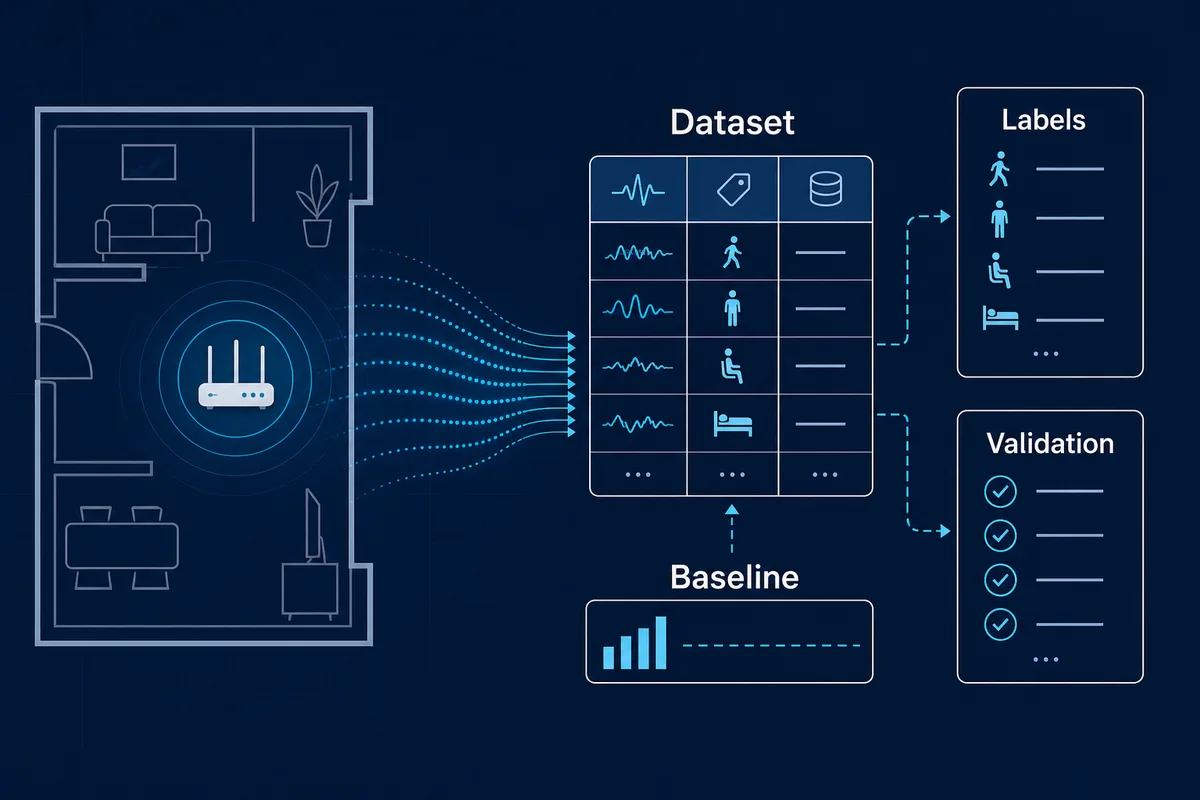
A practical RuView dataset checklist has five stages: raw CSI capture, clean metadata, scenario labels, baseline trials, and validation splits. Raw CSI lets you inspect signal quality. Metadata explains the room and hardware. Labels say what happened. Baselines show what the room looks like when nothing relevant happens. Splits decide whether the model is learning a useful pattern or memorizing one room.
- For ESP32 experiments, record your own small baseline even when you train on public data.
- For motion or pose work, keep timing information and negative trials; aggregate labels alone are usually too thin.
- For privacy-sensitive claims, document consent, access limits, and whether synchronized video is part of the dataset.
Common Dataset Mistakes
The most common mistake is assuming that high accuracy on one dataset means the sensing system is ready for a new room. WiFi CSI is strongly shaped by walls, furniture, antenna placement, packet timing, and device firmware. A model can perform well because train and test data share the same environment, not because it understands human activity in a general way.
Another mistake is mixing dataset purposes. A dataset collected for single-person gestures may not support multi-person presence. A fall-detection set may not support daily activity monitoring. A benchmark with synchronized video may be appropriate for research labels but too sensitive for a lightweight demo. Good RuView content should make those boundaries visible so users do not mistake a demo for a certified health, security, or safety system.
| Mistake | Why it matters | Safer approach |
|---|---|---|
| Using one-room accuracy as proof | The model may memorize room-specific multipath | Test across rooms, sessions, and device placements |
| Ignoring empty-room data | False positives are hard to detect | Capture baselines and no-person negative trials |
| Treating video labels as harmless | Reference video may carry privacy obligations | Explain consent, storage, and access boundaries |
| Comparing incompatible tasks | Gesture, presence, breathing, and pose need different labels | Choose datasets by task before choosing a model |
A Small Dataset Plan for ESP32 and RuView Tests
If public data does not match your exact room, build a small local dataset before trusting the demo. A useful first pass can be modest: empty room, one person entering, one person leaving, walking across the link, sitting still, door movement without a person, and router traffic without movement. Repeat each scenario enough times to see whether the signal changes are stable.
Keep the files boring and well named. Store raw capture, cleaned features, labels, room notes, and split definitions separately. A future model or visualization layer should be able to trace every prediction back to a capture session. That traceability is what turns a RuView-style page from a visual demo into a responsible sensing workflow.
- Name sessions by date, room, device placement, band, and scenario.
- Keep raw CSI separate from filtered features so you can rerun preprocessing.
- Reserve at least one session or room for testing instead of random row-level splitting.
How This Page Avoids Cannibalizing Existing RuView Pages
This dataset guide has a distinct search intent. The homepage targets RuView demo and brand queries. The GitHub guide targets repository, setup, Docker, and source-code navigation. The ESP32 CSI guide targets hardware capture. The motion-capture guide targets WiFi DensePose and movement interpretation. This page targets dataset selection, benchmark comparison, labels, splits, and validation planning.
That separation helps users and search engines. Someone searching for “ruview github” should land on the GitHub guide, not this page. Someone searching for “wifi sensing dataset” needs a benchmark and data-quality checklist before they decide whether RuView, ESP32, or a public CSI corpus is the right next step.
Search-intent map: dataset, benchmark, tutorial, or local capture?
The phrase WiFi sensing dataset can mean several jobs. Some users want a downloadable CSI corpus, some want a benchmark library, some want a tutorial dataset for ESP32, and some want a validation plan for a RuView demo. Treating those as one intent leads to weak recommendations.
Use a simple intent map before choosing data. If the task is learning, pick a documented benchmark. If the task is product validation, collect a local baseline. If the task is human activity recognition, require repeated activity labels. If the task is presence, prioritize empty-room and false-positive trials.
| Intent | Best data choice | Avoid |
|---|---|---|
| Learn the pipeline | SenseFi or a documented public CSI benchmark | Undocumented zip files with no split. |
| Validate a room | Small local ESP32 dataset plus baselines | Only public data from another building. |
| Human activity recognition | Repeated labeled activity trials | Presence-only datasets. |
| RuView demo review | Data with limits, negatives, and screenshots separated | Treating UI success as model proof. |
Sources and Dataset References
WiFi Sensing Dataset FAQ
What is the best WiFi sensing dataset for beginners?
Start with a well-documented benchmark such as SenseFi if your goal is learning models and reproducible splits. If your goal is a room-specific RuView demo, collect a small local baseline dataset as well.
Can I train RuView directly on any CSI dataset?
Not safely. The dataset must match the hardware, room assumptions, labels, and task you want. Public CSI data can teach the pipeline, but local validation is still needed.
Why do empty-room baselines matter?
They reveal signal changes caused by the environment, devices, traffic bursts, or doors instead of people. Without baselines, false positives are easy to miss.
Are WiFi sensing datasets privacy sensitive?
Yes. CSI may not be video, but it can reveal occupancy, activity, and routines. Datasets with synchronized video or human labels need especially careful consent and access rules.
Should I use a public WiFi sensing dataset or collect my own?
Use public data to learn the pipeline and compare methods, but collect your own baseline when the goal is a RuView-style result in a specific room.