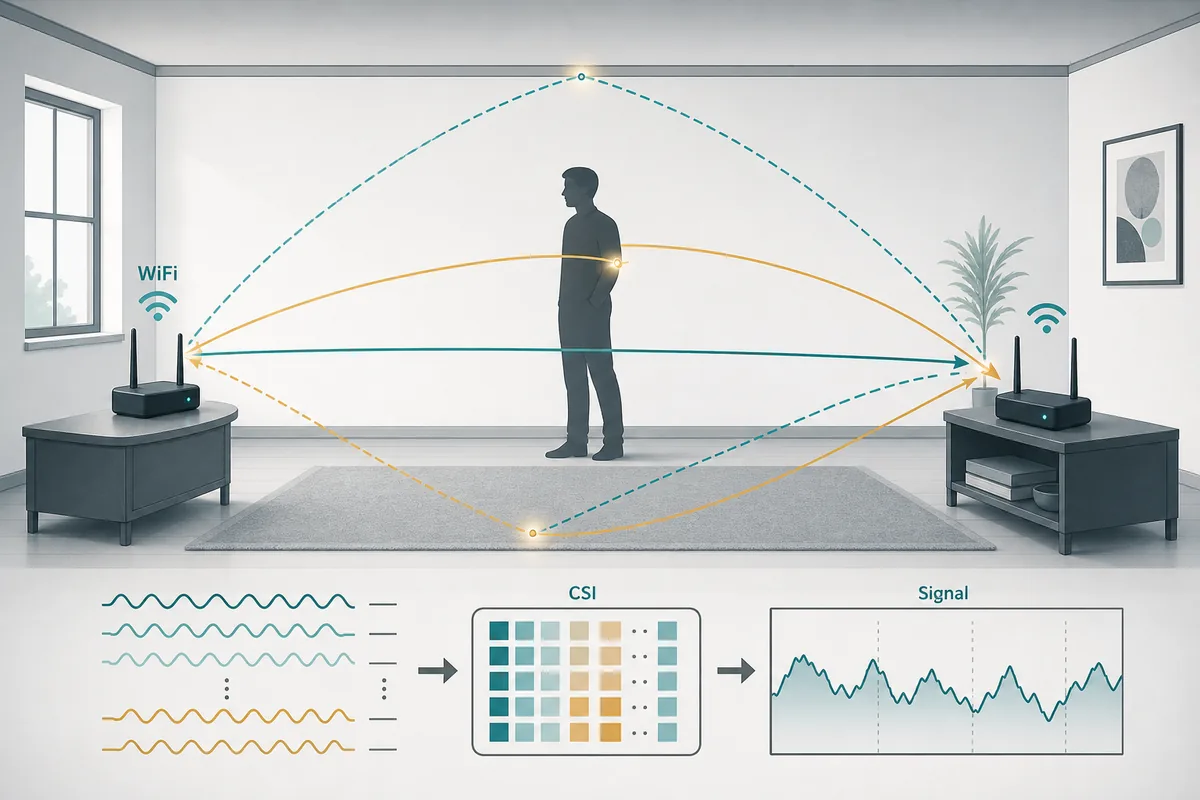
Channel State Information is the missing concept behind many WiFi sensing claims. RSSI can tell you that a signal became stronger or weaker, but CSI can expose how different WiFi subcarriers changed as the signal moved through a room. Those fine-grained changes are why WiFi CSI appears in human detection, activity recognition, breathing research, localization, and RuView-style camera-free sensing workflows.
The important point is restraint. CSI data can be rich, but it is not a literal image of a person. It is a noisy measurement of a radio channel. Furniture, walls, antenna orientation, firmware, packet timing, people, pets, fans, and moving doors can all change the channel. A useful WiFi sensing page should therefore explain what CSI measures, how to capture it, and how to validate it before claiming presence, pose, or vital-sign results.
What Channel State Information means
In a WiFi link, a transmitter sends packets and a receiver estimates how the radio channel affects those packets. Channel State Information describes that channel response at a finer level than a single strength number. In simplified terms, CSI tells you how each subcarrier was changed by the environment between the transmitter and receiver.
For sensing, that matters because bodies and movement disturb multipath propagation. A person walking across the link, sitting still, breathing near the path, or changing posture can alter the amplitude and phase patterns. The sensing system then compares those patterns against baselines, labels, and models. CSI is the measurement layer; detection or interpretation is a separate step built on top of it.
- RSSI is a coarse signal-strength summary; CSI is a richer channel response.
- CSI is usually represented per subcarrier and can include amplitude and phase information.
- A sensing model infers presence or activity from CSI changes, not from visual pixels.
CSI data versus RSSI: why the distinction matters
Many beginner experiments start with RSSI because it is easier to read from ordinary WiFi devices. RSSI can be useful for rough proximity or link-quality checks, but it hides most of the structure that sensing researchers need. If two different events create a similar strength drop, RSSI may not separate them.
CSI keeps more detail. It lets the workflow inspect how multiple subcarriers move over time, how stable the channel is, and whether a pattern repeats across trials. That extra detail also increases responsibility: bad calibration, bad labels, or overfitted room data can still produce confident but misleading results.
| Signal layer | What it gives you | Sensing risk |
|---|---|---|
| RSSI | One coarse signal-strength value | Often too compressed for activity or pose claims |
| CSI amplitude | Subcarrier-level magnitude changes | Sensitive to placement, noise, and room geometry |
| CSI phase | Timing and path-related signal changes | Needs careful correction before interpretation |
| RuView output | A user-facing explanation layer | Can overstate certainty if validation is hidden |
How a WiFi CSI sensing workflow is built
A practical workflow starts with repeatable packet capture, not with a model. First choose compatible hardware, lock the WiFi channel where possible, record packet rate and placement, and collect empty-room baselines. Then collect labeled sessions for simple scenarios such as empty, occupied, walking, door movement, and fan movement. Only after that should preprocessing and model training begin.
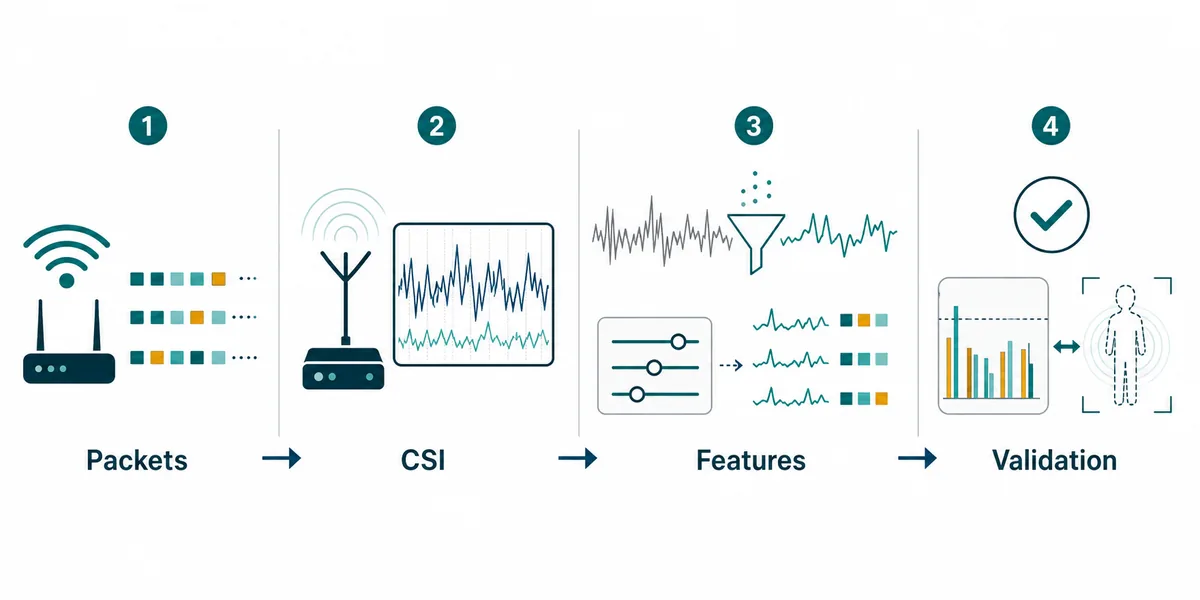
The workflow below is the safe mental model: packets become CSI, CSI becomes cleaned features, features become labels or predictions, and predictions must be validated against unseen days, changed placements, and negative cases.
- Capture packet metadata, board or NIC model, channel, antenna placement, and firmware version.
- Keep train and test sessions separated by time, person, and placement when possible.
- Treat unknown or low-confidence states as a normal output, not as a failure of the interface.
Hardware paths: ESP32, research NICs, and GitHub tools
Not every WiFi device exposes CSI. A laptop may show signal strength while hiding the subcarrier data. ESP32-based projects are attractive because they make CSI capture accessible and inexpensive for experiments. Research NIC paths such as the classic Intel 5300 CSI Tool and newer firmware projects are useful when a study needs a different radio stack or deeper capture control.
Choose hardware by the question you want to answer. For learning the shape of CSI data, an ESP32 path can be enough. For pose-like inference or stronger localization, multiple links, stricter synchronization, and more carefully controlled data are usually required. GitHub stars matter less than a repository that names exact boards, firmware, sample data, export format, and known limitations.
| Path | Best fit | What to verify first |
|---|---|---|
| ESP32 CSI | Low-cost learning, room baselines, simple presence or motion tests | Board support, packet stability, raw export, documentation |
| Research NIC tools | Reproducing papers or deeper CSI experiments | Driver support, OS version, capture scripts, sample traces |
| RuView-style demo layer | Explaining results and limitations to users | That the upstream CSI pipeline is repeatable and validated |
Validation: the part that prevents overclaiming
CSI sensing can look convincing in a short demo because radio changes are visually interesting. The hard question is whether the same result survives a moved router, a different day, a second person, an open door, a pet, a fan, or a changed channel. A responsible validation plan tests false positives as carefully as positive examples.
For RuView-style content, the page should distinguish observed signal change from confirmed human state. A clean result panel should show context, confidence, unknown states, and limits. If a model was trained and tested in the same room with the same person on the same afternoon, describe it as a controlled demo, not as general WiFi human detection.
- Record empty-room baselines before and after positive trials.
- Add negative cases that change the environment without the target human action.
- Report where confidence drops instead of hiding uncertain samples.
- Avoid medical, emergency, or security guarantees unless independently validated.
How this guide fits with the RuView resource cluster
This page targets the foundational query behind WiFi CSI: what Channel State Information is and why CSI data matters. It does not replace the ESP32 CSI guide, which focuses on hardware capture. It does not replace the dataset guide, which focuses on labels and benchmarks. It does not replace the WiFi human detection page, which focuses on presence and reliability. It gives those pages a shared vocabulary.
That separation reduces cannibalization. Searchers who ask what CSI means can start here. Searchers who already know CSI and need a board can move to the ESP32 guide. Searchers comparing repositories can use the open source guide. Searchers trying to understand detection claims can use the human detection and motion capture guides.
Sources and technical references
Channel State Information FAQ
What is Channel State Information in WiFi?
Channel State Information, or CSI, describes how a WiFi channel changes a transmitted signal across subcarriers. For sensing, it provides richer radio-channel detail than RSSI.
Is CSI data the same as a WiFi image?
No. CSI is a signal measurement, not a visual image. A model may infer presence or motion from CSI changes, but it does not see a person like a camera.
Can ESP32 capture Channel State Information?
ESP32-based CSI projects can capture useful CSI for learning and simple experiments when the board, firmware, channel, and packet flow are configured correctly.
Why do WiFi sensing models fail in new rooms?
CSI depends on room geometry, antenna placement, furniture, people, packet timing, and environmental changes. A model trained in one setup may learn the room instead of a general human signal.
Where should I go after learning CSI basics?
Use the ESP32 CSI guide for hardware capture, the dataset guide for labels and validation splits, and the WiFi human detection guide for presence-detection limits.