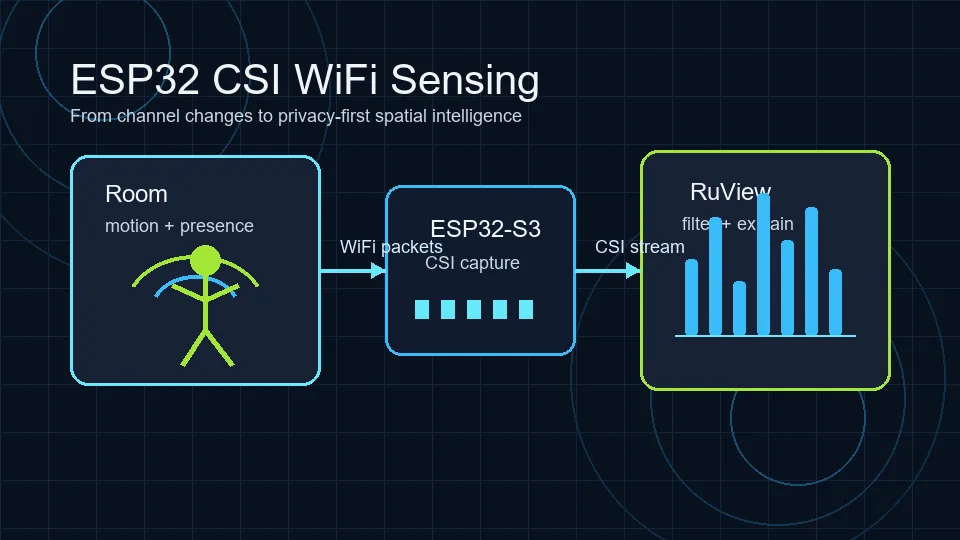
ESP32 CSI WiFi sensing starts with a simple idea: a WiFi receiver can observe how radio packets are distorted by the room between transmitter and receiver. Those distortions are called Channel State Information, or CSI. Instead of treating WiFi only as a network connection, a sensing system reads the small amplitude and phase changes caused by people, furniture, walls, movement, breathing, and multipath reflections.
That makes ESP32 boards attractive for privacy-first experiments. They are inexpensive, widely available, and supported by open-source projects such as Espressif ESP-CSI and the ESP32 CSI Tool. They do not replace cameras, radar, medical devices, or validated safety systems, but they are a useful way to learn the signal pipeline before evaluating RuView or WiFi DensePose-style demos.
What ESP32 CSI Measures
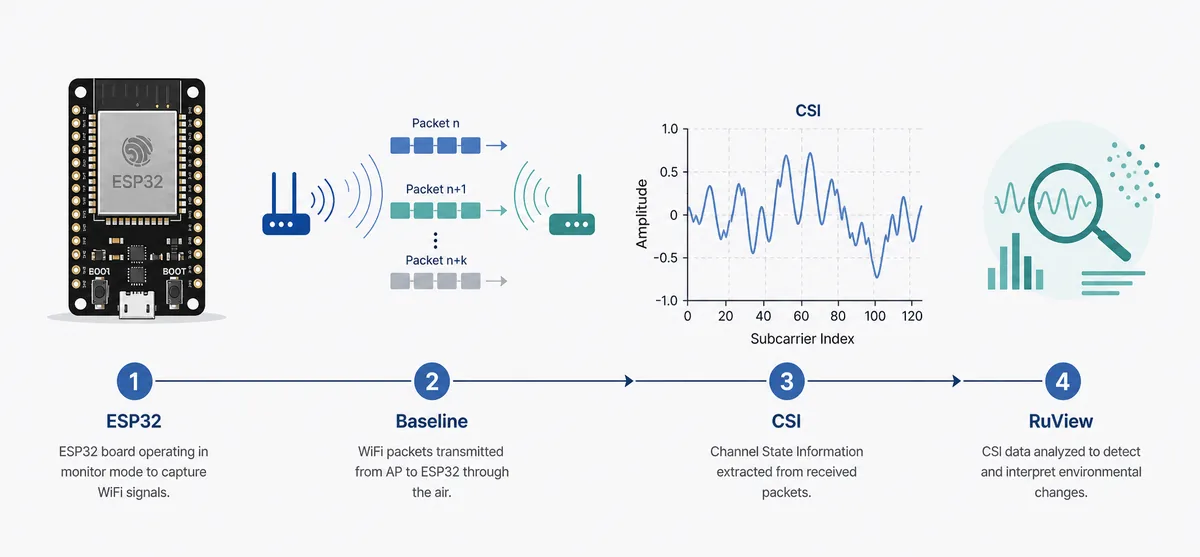
CSI describes the wireless channel between a sender and a receiver at the subcarrier level. In practical ESP32 work, the receiver records complex values that represent how each part of an OFDM WiFi signal changed before arrival. When a person walks through the path, sits down, waves a hand, or breathes near the link, the multipath pattern can shift enough for a model or thresholding pipeline to notice.
This is richer than RSSI. RSSI is a single strength number, so it can tell you that received power changed, but it loses most of the frequency-selective detail. CSI keeps more structure: amplitude, phase-related behavior, packet timing, and metadata around the received packet. That structure is why CSI is used for indoor positioning, activity recognition, presence detection, and research into camera-free pose estimation.
- Use CSI when you need fine-grained signal changes, not just a coarse signal-strength trend.
- Expect the room layout, antenna orientation, packet rate, and calibration baseline to matter.
- Treat any health, fall, or security output as experimental until independently validated.
Which ESP32 CSI Path Should You Use?
Most beginners choose between three paths. The router path uses one ESP32 receiver and ordinary router traffic or ping replies. It is the fastest way to collect data, but the router location and traffic rhythm can limit repeatability. A two-board path gives you more control because one ESP32 sends and another receives. A multi-node or common-clock path is harder, but it is closer to research systems that need synchronized phase or spatial diversity.
RuView-style experiments usually care about repeatable sensing rather than a single impressive demo. If you only want to understand the concept, start with one ESP32-S3 and a router. If you want a dataset, compare multiple board placements. If your goal is pose, breathing, or multi-person interpretation, assume you need more careful hardware, controlled packet generation, and a labeled evaluation process.
| Setup | Best for | Tradeoff |
|---|---|---|
| One ESP32 plus router | Fast proof of concept and room-presence tests | Router placement and packet timing affect data quality |
| Two ESP32 boards | Controlled sender/receiver experiments | Requires firmware setup on both devices |
| Multiple synchronized nodes | Localization, phase-sensitive research, and stronger datasets | Higher hardware, calibration, and analysis complexity |
Does ESP32-S3 support WiFi CSI?
ESP32-S3 can expose Channel State Information when the selected ESP-IDF version, WiFi mode, and CSI callback path support it. Confirm the chip, framework release, example project, and receive mode instead of relying on the board name alone.
Start with an official ESP-CSI or ESP-IDF example, record firmware and channel settings, and verify stable packet counts before adding a human-detection model.
- Confirm explicit ESP32-S3 support for your ESP-IDF release.
- Keep channel, bandwidth, antenna position, and packet rate fixed.
- Treat missing callbacks or changing subcarrier counts as capture problems.
A RuView-Friendly Test Workflow
A useful ESP32 CSI workflow begins before the first model. Place the receiver, record the room when empty, then repeat simple scenarios: walking across the link, entering and leaving, sitting still, opening a door, and breathing close to the sensing path. Keep notes about distance, antenna direction, furniture, people count, and WiFi channel. Without that context, a later graph may look meaningful while actually reflecting a router burst or a moved laptop.
After capture, filter out malformed lines, align timestamps, separate amplitude and phase features, and compare the signal against the empty-room baseline. A RuView-style layer can then explain what each stage means: raw CSI, denoised features, confidence, limitations, and a clear warning that the result is not a certified health or safety decision.
- Capture baseline data before each room session.
- Keep packet rate and channel settings as stable as possible.
- Label every trial with the action, person count, distance, and device placement.
- Show limitations beside the result so users do not overread experimental signals.
How to Validate ESP32-CSI-Tool Captures Before Modeling
Broader ESP32 CSI searches often mix capture, sensing, and detection intent. Keep this guide focused on capture quality: stable timestamps, expected subcarrier fields, a documented WiFi channel, and visible differences between empty-room, motion, and negative-control trials.
- Use a short empty-room capture as the baseline for each session.
- Run one negative control such as door movement or router traffic without a person.
- Keep board, antenna orientation, channel, and packet rate unchanged while comparing trials.
- Move to RuView interpretation only after the raw CSI trace is repeatable.
Where ESP32 CSI Works Well and Where It Struggles
ESP32 CSI is strongest when the task is narrow: occupied versus empty, motion versus stillness, a repeated gesture in a fixed room, or a known person crossing a known path. It struggles when the environment changes often, when many people move at once, when packet rates are irregular, or when the system claims too much from too little hardware. Breathing and heart-rate research is possible in controlled settings, but it is not the same as a validated medical monitor.
This is the main reason RuView should be presented as an experimental spatial-intelligence gateway. A good page should help users launch the demo, but it should also explain that cameras, mmWave radar, PIR sensors, and WiFi CSI each see the world differently. CSI is valuable because it is private, cheap, and already present in many environments; it is limited because radio multipath is hard to interpret without calibration and ground truth.
How This Relates to WiFi DensePose and RuView
Searchers often arrive from terms such as WiFi DensePose GitHub, ESP32 CSI, or RuView demo. Those intents overlap, but they are not identical. WiFi DensePose is usually a pose-estimation curiosity: can WiFi signals infer body shape or motion without a camera? ESP32 CSI is the hardware and data-collection foundation. RuView is the browser-facing place where users can explore the demo, read the project boundaries, and connect the concept to open-source code.
For SEO and user clarity, this page should not replace the RuView homepage. The homepage remains the best target for brand, demo, and GitHub navigational queries. This guide supports it by answering the broader practical question: what does an ESP32 CSI sensing setup actually need before RuView-style interpretation can be trusted?
ESP32 CSI setup checklist for repeatable RuView tests
ESP32 CSI experiments fail most often because the capture context is not repeatable. Before comparing models, lock the board model, firmware, WiFi channel, antenna position, packet rate, room layout, and label protocol. This turns an ESP32 CSI demo into a dataset that RuView-style analysis can inspect.
A practical first session should include empty-room capture, one person entering, one person sitting still, walking across the link, door movement without a person, and a short period of normal router traffic. These negative cases are what reveal whether the signal reacts to people or to any environmental change.
| Check | Record this | Why it matters |
|---|---|---|
| Hardware | Board, firmware, antenna placement | Avoids comparing different signal paths. |
| Radio | Channel, bandwidth, packet rate | CSI shape changes with radio settings. |
| Room | Furniture, router path, participant location | Multipath is room-specific. |
| Labels | Scenario, timestamp, repeated trials | Validation needs more than a screenshot. |
ESP32 CSI extraction: a minimal repeatable test
To use ESP32 CSI, prove the capture path before training a model. Fix the board, ESP-IDF version, WiFi channel, bandwidth, antenna position, and packet rate. Save raw samples with timestamps, then compare an empty-room baseline with one simple movement and one negative control.
The useful output is not a single graph. A repeatable ESP32 CSI extraction test should show whether callbacks arrive consistently, subcarrier fields are populated, and the change survives a second session. Only then should you add human detection or RuView interpretation.
- Record the ESP32-S3 and ESP-IDF versions with every session.
- Compare one repeatable movement with a door or router-traffic negative control.
- Keep raw CSI before filtering so later results can be traced back to the capture.
Authoritative Sources and Useful Repositories
ESP32 CSI WiFi Sensing FAQ
Is ESP32 CSI the same as RSSI?
No. RSSI is a coarse signal-strength value, while CSI preserves more channel detail across WiFi subcarriers. CSI is more useful for sensing, but it also needs more careful capture, filtering, and validation.
Can one ESP32 detect human presence?
One ESP32 plus a router can be enough for simple presence experiments in a fixed room, especially when you compare against an empty-room baseline. It is not enough for reliable pose, medical, or safety decisions by itself.
Which board is best for ESP32 CSI sensing?
ESP32-S3, ESP32-C3, ESP32-C5, and ESP32-C6 are common choices depending on the project and tooling. Check the current Espressif ESP-CSI documentation before buying hardware because chip support and examples evolve.
How does this help RuView users?
RuView users often want to know what happens below the demo interface. ESP32 CSI explains the signal-capture layer: packets are received, channel changes are recorded, features are filtered, and the interpretation layer turns those features into presence or activity signals.
What should I record before using ESP32 CSI with RuView?
Record the board, firmware, WiFi channel, antenna placement, packet rate, room layout, scenario labels, and empty-room baseline before comparing any RuView-style output.
Should I use ESP32-CSI-Tool or Espressif ESP-CSI first?
Use the path that matches your board and documentation comfort. ESP32-CSI-Tool is useful for learning serial capture and quick experiments, while Espressif ESP-CSI is closer to the official solution path. In both cases, validate timestamps, channel settings, and baseline trials before modeling.
Does ESP32-S3 support CSI for WiFi sensing?
Yes, with compatible ESP-IDF and project settings. Verify the framework, WiFi mode, CSI callback, channel, and repository, then confirm stable raw captures.
How do I use ESP32 CSI for a first WiFi sensing test?
Fix the board, firmware, channel, bandwidth, antenna position, and packet rate. Capture an empty-room baseline, one repeatable movement, and one negative control before training a model or interpreting the result in RuView.