RuView motion captureを検索する人は、WiFi信号だけで身体の動きを追えるのかを知りたいはずです。CSIは動きのパターンを示せますが、実用的な設定には制御されたハードウェア、反復試験、部屋のベースライン、不確実性の表示が必要です。
このページはオンラインデモ、GitHubガイド、ESP32 CSIガイドの間にある解説です。CSIストリームが動きについて何を示せるか、姿勢らしい信頼度をどう読むべきかを説明します。
RuView Motion Captureの意味
RuView motion captureは通常の映像スケルトンを作るものではありません。人が動いたときの無線経路の変化を観測し、動きの状態、ジェスチャー、姿勢の手がかりとして解釈します。
カメラはピクセルを見ますが、WiFi CSIはマルチパス伝搬の変化を見ます。壁、家具、アンテナ、パケット間隔、他の人が測定に影響するため、これは実験として扱う必要があります。
- motion captureは動き推定の意味で使い、完全な全身追跡を約束しません。
- 出力にはベースライン、校正、信頼度を併記します。
- 姿勢、呼吸、転倒、健康関連の信号は独立検証まで研究信号として扱います。
WiFi DensePoseの位置づけ
RuView motion captureは通常の映像スケルトンを作るものではありません。人が動いたときの無線経路の変化を観測し、動きの状態、ジェスチャー、姿勢の手がかりとして解釈します。
CSIはRSSIより多くの構造を持つため、反復可能な取得、安定リンク、ラベル付きシナリオ、フィルタリング、モデル評価、否定例が必要です。
| Layer | What it handles | Common failure mode |
|---|---|---|
| CSI capture | Subcarrier-level channel changes from WiFi packets | Hardware exposes only RSSI or unstable packet timing |
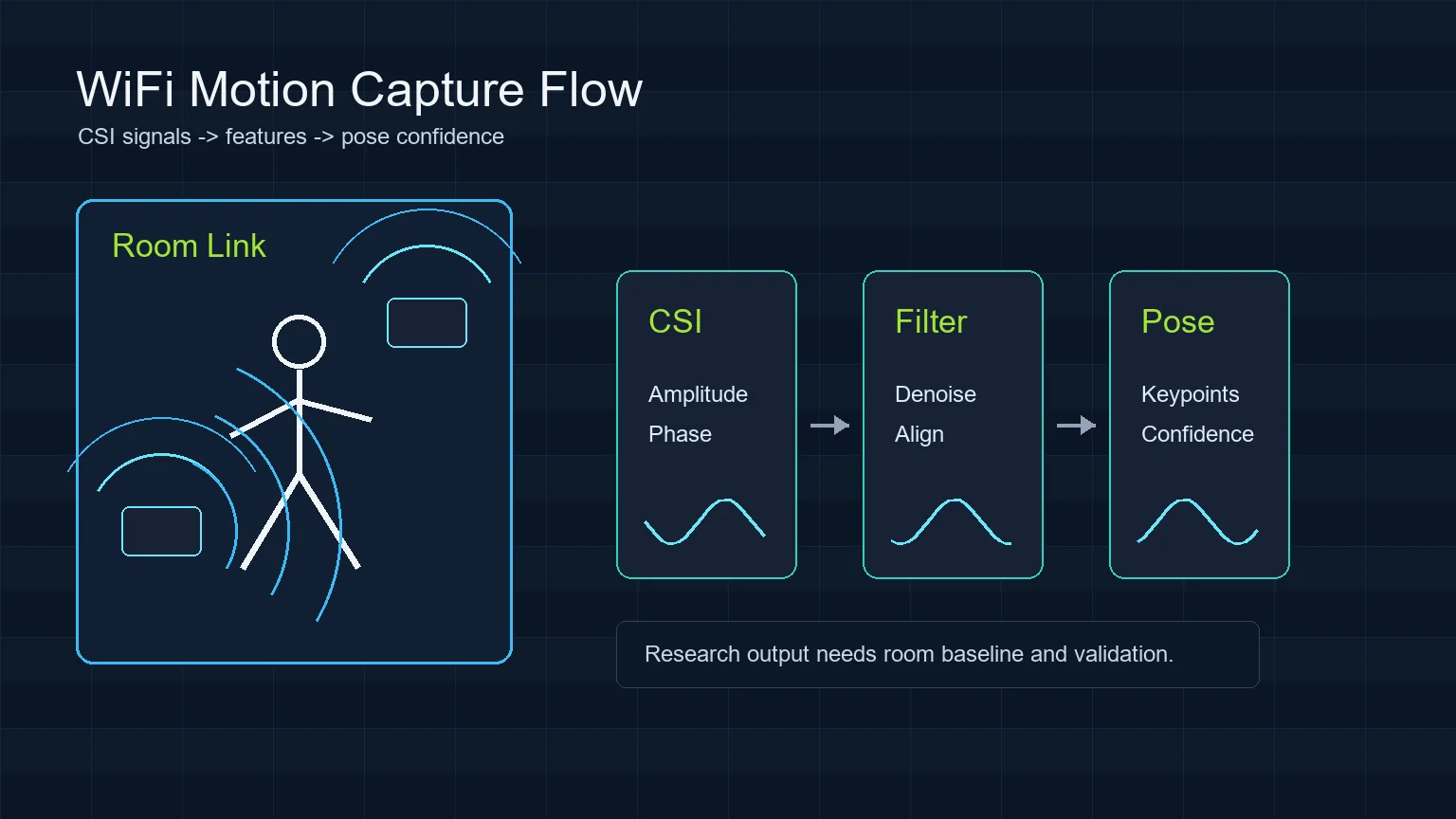
| Feature processing | Denoising, alignment, amplitude and phase-derived features | Room change looks like human motion |
| Model interpretation | Presence, gesture, keypoint, or pose confidence | Confidence is mistaken for ground truth |
| Validation | Baseline, labels, repeated trials, false-positive checks | Demo succeeds once but cannot be reproduced |
実用的なRuView Motion Capture手順
狭い問いから始め、空室ベースラインを記録し、同じ動作を繰り返してから解釈レイヤーを表示します。
After capture, clean malformed rows, align timestamps, separate amplitude and phase-derived features, and compare the trial against the empty-room baseline. Only then should you show an interpretation layer such as motion state, skeleton confidence, or activity label. The page or demo should keep limits visible so viewers understand what the model can and cannot claim.
- Define one scenario before collecting data.
- Record empty-room, door-movement, and no-person false-positive trials.
- Keep hardware placement, WiFi channel, packet rate, and room layout in the experiment notes.
ハードウェアとセットアップ
まずソフトウェアを確認し、次にCSIを取得できるハードウェアを確認し、最後に反復可能な部屋実験を行います。
Users should separate software setup from sensing setup. First confirm the hosted RuView demo or local repository path works. Then confirm the hardware can expose CSI. Finally, run repeatable room trials. Skipping this order makes debugging harder because UI issues, driver limits, and sensing errors get mixed together.
| Goal | Reasonable starting point | What to verify |
|---|---|---|
| Learn the interface | RuView online demo | Page loads and explains limitations |
| Inspect code | ruvnet/RuView GitHub repository | README, issues, setup path, current status |
| Capture simple motion | ESP32 CSI or compatible WiFi CSI hardware | CSI rows, timestamps, packet stability |
| Study pose-like output | Multiple controlled links and labeled trials | Reproducibility, false positives, confidence calibration |
WiFi Motion Captureの検証方法
検証にはベースライン、反復した成功例、対象動作がない否定例が必要です。
A responsible result report should show what was tested, how many repeats were run, what failed, and where confidence dropped. If a motion label appears only in one room, with one antenna position, and without negative tests, describe it as a demo observation rather than a general capability.
- Use repeated trials, not a single successful screen.
- Document room layout, sensor placement, people count, and WiFi settings.
- Compare pose or vital-sign claims with independent references before relying on them.
避けたい誤解
WiFi see through wallsは壁越しに鮮明な映像を見るという意味ではありません。文脈依存の実験的な信号です。
The strongest RuView content makes the boundary explicit: the homepage is for the online demo, the GitHub guide is for repository and setup checks, the ESP32 CSI guide is for hardware capture, and this page is for the motion-capture interpretation workflow. Keeping those boundaries clear helps searchers find the right page and reduces cannibalization between topics.
- Do not call RSSI-only changes dense pose.
- Do not present generated visuals as real sensing screenshots.
- Do not use WiFi motion capture for medical, security, or safety decisions without independent validation.
情報源と技術リファレンス
RuView Motion Capture FAQ
RuViewはカメラのように全身を追跡できますか?
同じ意味ではありません。WiFiの流れは動きや姿勢の手がかりを推定しますが、ハードウェア、部屋、校正、モデル、検証に依存します。
WiFi DensePoseはRuViewと同じですか?
いいえ。WiFi DensePoseは研究方向で、RuViewは関連するWiFiセンシングを試すプロジェクトとデモです。
最初に試すべき実験は?
空室/在室、または既知リンクを横切る歩行から始めてください。
壁越しに見えますか?
直接見通し外の動きが信号に影響することはありますが、壁越しの鮮明な視覚ではありません。