RuView motion capture를 찾는 사람은 WiFi 신호만으로 몸 움직임을 추적할 수 있는지 알고 싶어합니다. WiFi CSI는 움직임 패턴을 보여줄 수 있지만 실제 설정에는 통제된 하드웨어, 반복 실험, 방 기준선, 명확한 불확실성이 필요합니다.
이 페이지는 온라인 데모, GitHub 가이드, ESP32 CSI 가이드 사이의 해설입니다. CSI 스트림이 움직임에 대해 무엇을 말할 수 있는지, 자세 신뢰도를 어떻게 읽어야 하는지 설명합니다.
RuView Motion Capture의 의미
RuView motion capture는 일반 영상 스켈레톤을 만드는 기능이 아닙니다. 사람이 움직일 때 무선 경로가 어떻게 바뀌는지 보고, 그 변화를 움직임 상태, 제스처 또는 자세 단서로 해석합니다.
카메라는 픽셀을 보지만 WiFi CSI는 다중 경로 전파 변화를 봅니다. 벽, 가구, 안테나, 패킷 간격, 다른 사람이 측정에 영향을 주므로 실험으로 다뤄야 합니다.
- motion capture는 움직임 추론으로 사용하고 완전한 전신 추적을 약속하지 마세요.
- 출력 옆에 기준선, 보정, 신뢰도를 함께 표시하세요.
- 자세, 호흡, 낙상, 건강 신호는 독립 검증 전까지 연구 신호로 다루세요.
WiFi DensePose가 들어맞는 위치
RuView motion capture는 일반 영상 스켈레톤을 만드는 기능이 아닙니다. 사람이 움직일 때 무선 경로가 어떻게 바뀌는지 보고, 그 변화를 움직임 상태, 제스처 또는 자세 단서로 해석합니다.
CSI는 RSSI보다 풍부한 구조를 제공하며 반복 가능한 캡처, 안정적인 링크, 라벨링된 시나리오, 필터링, 모델 평가와 음성 테스트가 필요합니다.
| Layer | What it handles | Common failure mode |
|---|---|---|
| CSI capture | Subcarrier-level channel changes from WiFi packets | Hardware exposes only RSSI or unstable packet timing |
| Feature processing | Denoising, alignment, amplitude and phase-derived features | Room change looks like human motion |
| Model interpretation | Presence, gesture, keypoint, or pose confidence | Confidence is mistaken for ground truth |
| Validation | Baseline, labels, repeated trials, false-positive checks | Demo succeeds once but cannot be reproduced |
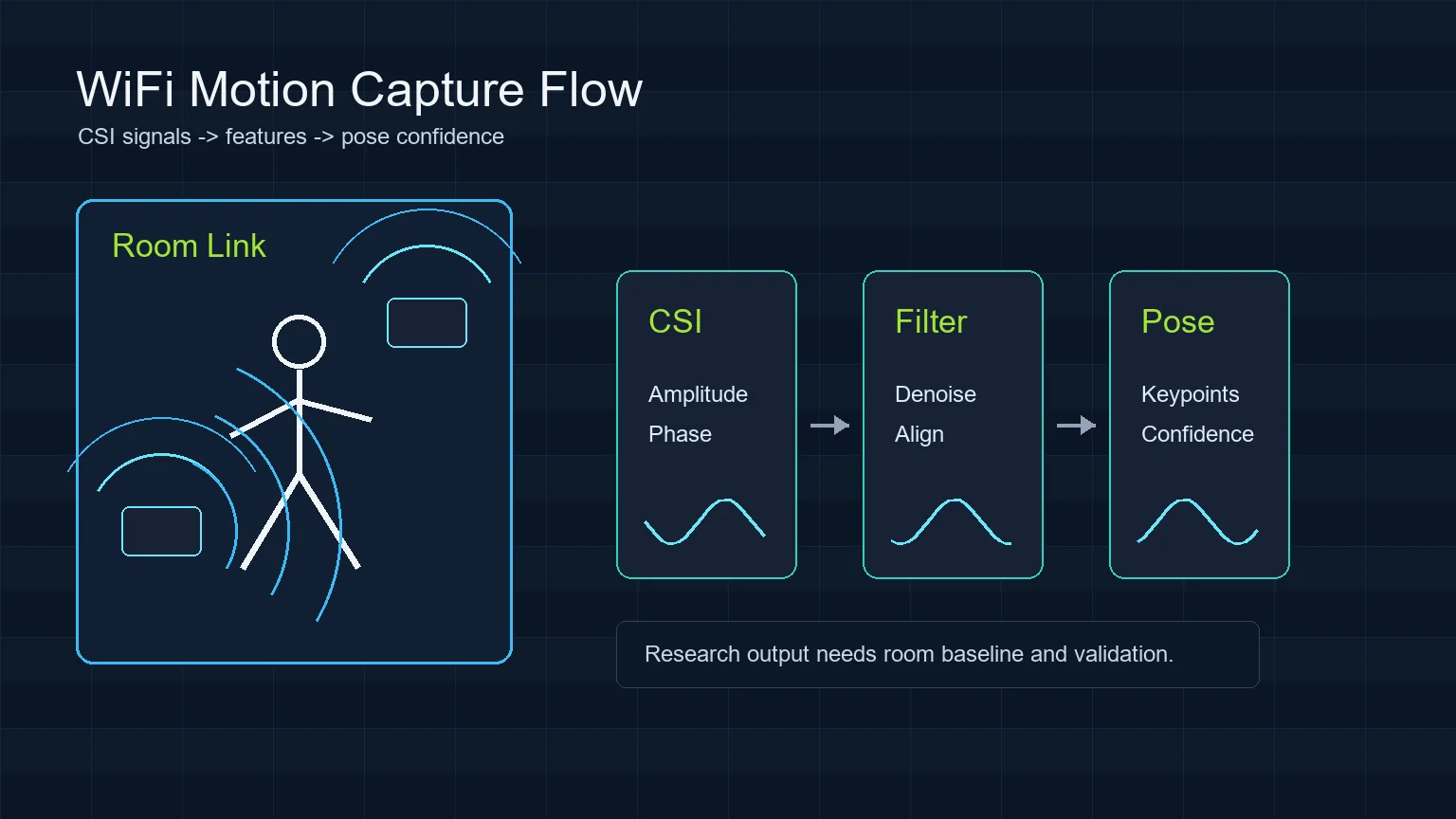
실용적인 RuView Motion Capture 흐름
좁은 질문에서 시작해 빈 방 기준선을 기록하고 동작을 반복한 뒤 조심스러운 해석을 표시합니다.
After capture, clean malformed rows, align timestamps, separate amplitude and phase-derived features, and compare the trial against the empty-room baseline. Only then should you show an interpretation layer such as motion state, skeleton confidence, or activity label. The page or demo should keep limits visible so viewers understand what the model can and cannot claim.
- Define one scenario before collecting data.
- Record empty-room, door-movement, and no-person false-positive trials.
- Keep hardware placement, WiFi channel, packet rate, and room layout in the experiment notes.
하드웨어와 설정
소프트웨어와 센싱을 분리하세요. 먼저 데모 또는 저장소, 다음 CSI 하드웨어, 마지막으로 반복 가능한 방 실험입니다.
Users should separate software setup from sensing setup. First confirm the hosted RuView demo or local repository path works. Then confirm the hardware can expose CSI. Finally, run repeatable room trials. Skipping this order makes debugging harder because UI issues, driver limits, and sensing errors get mixed together.
| Goal | Reasonable starting point | What to verify |
|---|---|---|
| Learn the interface | RuView online demo | Page loads and explains limitations |
| Inspect code | ruvnet/RuView GitHub repository | README, issues, setup path, current status |
| Capture simple motion | ESP32 CSI or compatible WiFi CSI hardware | CSI rows, timestamps, packet stability |
| Study pose-like output | Multiple controlled links and labeled trials | Reproducibility, false positives, confidence calibration |
WiFi Motion Capture 검증
검증에는 기준선, 반복된 양성 실험, 목표 동작이 없는 음성 실험이 필요합니다.
A responsible result report should show what was tested, how many repeats were run, what failed, and where confidence dropped. If a motion label appears only in one room, with one antenna position, and without negative tests, describe it as a demo observation rather than a general capability.
- Use repeated trials, not a single successful screen.
- Document room layout, sensor placement, people count, and WiFi settings.
- Compare pose or vital-sign claims with independent references before relying on them.
피해야 할 오해
WiFi see through walls는 벽 너머를 선명하게 보는 뜻이 아니라 맥락 의존적인 실험 신호입니다.
The strongest RuView content makes the boundary explicit: the homepage is for the online demo, the GitHub guide is for repository and setup checks, the ESP32 CSI guide is for hardware capture, and this page is for the motion-capture interpretation workflow. Keeping those boundaries clear helps searchers find the right page and reduces cannibalization between topics.
- Do not call RSSI-only changes dense pose.
- Do not present generated visuals as real sensing screenshots.
- Do not use WiFi motion capture for medical, security, or safety decisions without independent validation.
출처와 기술 참고자료
RuView Motion Capture FAQ
RuView가 카메라처럼 전신을 추적하나요?
같은 방식은 아닙니다. WiFi 흐름은 움직임 또는 자세 단서를 추론하며 하드웨어, 방, 보정, 모델, 검증에 의존합니다.
WiFi DensePose와 RuView는 같나요?
아닙니다. WiFi DensePose는 연구 방향이고 RuView는 관련 아이디어를 탐색하는 WiFi 센싱 프로젝트와 데모입니다.
가장 쉬운 첫 실험은 무엇인가요?
빈 방/점유 상태 또는 알려진 링크를 가로지르는 걷기부터 시작하세요.
벽 너머를 볼 수 있나요?
직접 시야 밖 움직임이 신호를 바꿀 수는 있지만 벽 너머를 선명하게 보는 것은 아닙니다.