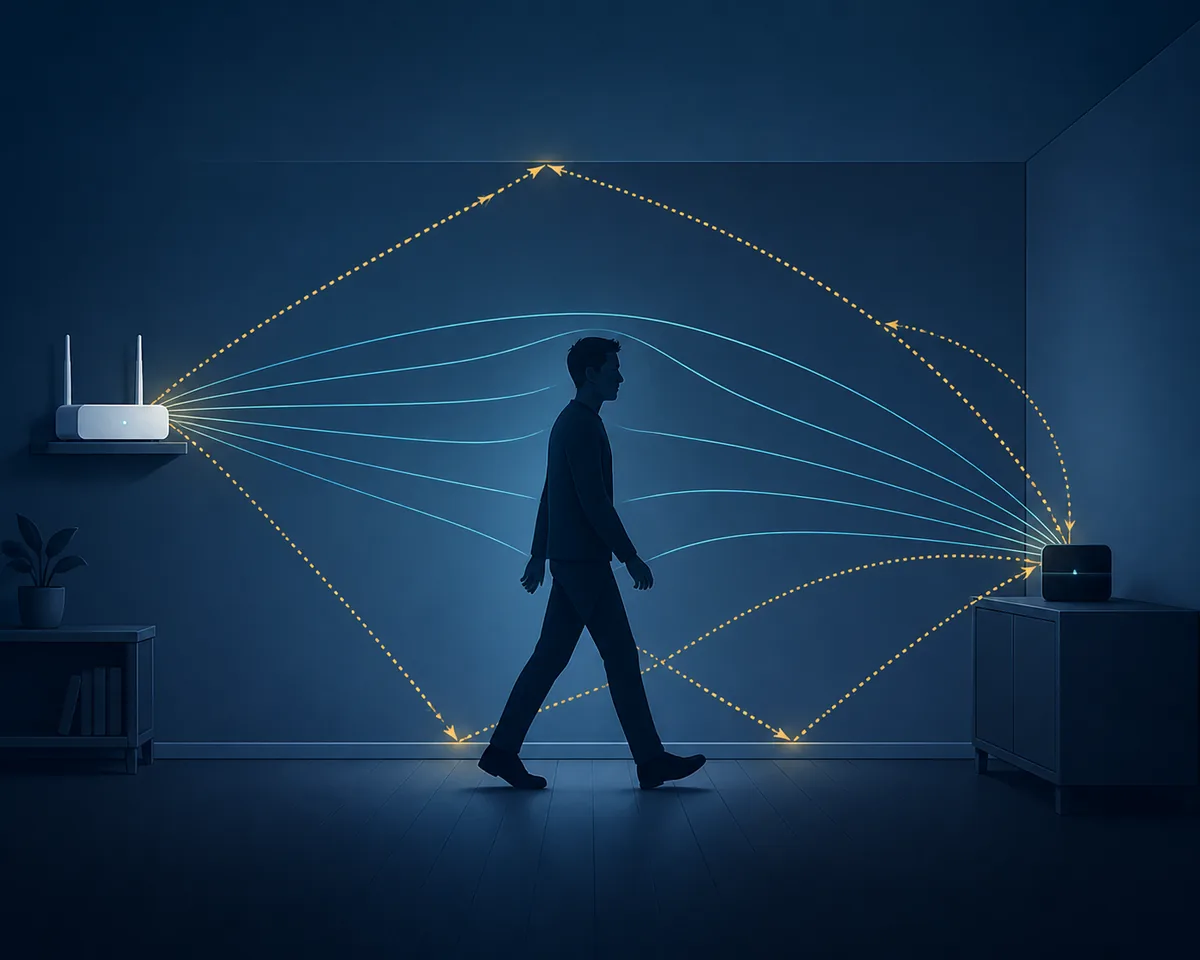
WiFi radar is a useful search phrase, but it is not one universally defined product. In human-sensing discussions, people usually mean a system that watches how WiFi signals change when a person moves, stands, sits, or crosses a room. The system may use Channel State Information (CSI), a passive-radar processing chain, or a commercial WiFi sensing feature. Those approaches share the idea that bodies change radio propagation, but they do not expose the same measurements or produce the same kind of result.
The practical question is therefore not simply whether WiFi can act like radar. It is which radio measurement is available, which hardware exposes it, what the model was trained to recognize, and how the result was validated. This guide uses WiFi radar as the main term, then separates CSI sensing, passive WiFi radar, RSSI-only experiments, and camera or mmWave systems so that a promising demo is not mistaken for a reliable people tracker.
What people mean by WiFi radar
A WiFi radar system observes a radio link or a radio scene and looks for structured changes over time. A moving person changes direct and reflected paths, attenuation, phase relationships, and the way energy arrives at a receiver. Software can summarize those changes as motion, occupancy, a coarse location, or a research feature vector. The output is an inference about the scene, not a photograph or a guaranteed identity.
The phrase is also used for unrelated things. WiFi radar can mean a wireless-network scanner, a weather-radar application that happens to use WiFi, or a marketing label for a smart-home sensor. In this article, WiFi radar means human or room sensing from WiFi radio behavior. A good page or project should state the signal source, receiver, frequency, target task, and validation conditions instead of relying on the label alone.
- The input is a time series of radio measurements, not an RGB or depth image.
- The target may be motion, presence, activity, location, or a pose-related research signal.
- The same room can produce different results after furniture, antenna, channel, or firmware changes.
- A project called WiFi radar may still be a CSI collector, a model demo, or a complete commercial sensor; check the evidence.
WiFi radar vs WiFi CSI sensing
WiFi CSI sensing is one concrete route into WiFi radar-style human sensing. CSI keeps amplitude and phase-related information across subcarriers and packets, so a receiver can study finer channel structure than a single received-power number. Passive WiFi radar uses an illuminator of opportunity, such as an existing transmitter, and processes a reference signal plus echoes or changes from the scene. Some systems combine ideas from both families, while others use a vendor-specific feature set that is not exposed as raw CSI.
The distinction matters when choosing hardware or comparing GitHub repositories. A CSI tutorial may help you collect a signal but provide no people classifier. A passive-radar paper may assume synchronized reference and surveillance channels that an ESP32 example does not expose. RSSI can be useful for a coarse experiment, but it is usually too compressed to support strong claims about pose, identity, or exact location.
| Approach | What it measures | Typical output | What to verify |
|---|---|---|---|
| Passive WiFi radar | A reference transmission and scene-related changes or echoes | Motion, range or activity research signals | Reference channel, synchronization, geometry, and clutter handling |
| WiFi CSI sensing | Amplitude and phase-related channel values across packets and subcarriers | Presence, motion, activity, or learned features | CSI access, firmware, packet context, calibration, and labels |
| RSSI-only experiment | A coarse received-signal-strength time series | Link-change or simple trigger events | Noise, multipath, sampling rate, and whether the task is too ambitious |
| Camera or mmWave sensor | Pixels/depth or dedicated radar measurements | Visual pose, range zones, or fine motion | Privacy, placement, calibration, and the sensor's actual specification |
How a human-sensing setup reads radio changes
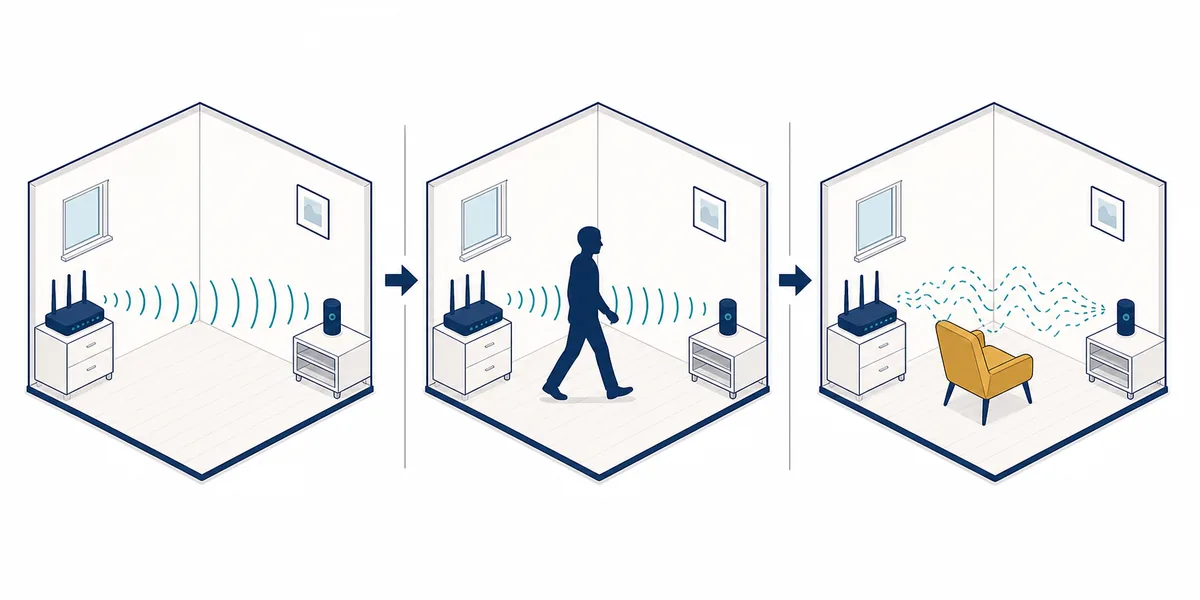
A simple setup has a stable packet source, a receiver, a fixed room, and a defined observation window. The transmitter may be an access point or another WiFi node. The receiver records CSI or another supported measurement while a person moves through selected paths. Preprocessing removes corrupt packets, aligns or normalizes channels, filters obvious interference, and turns the time series into features. A threshold can flag a change; a trained model can classify a label; a stronger system can expose an unknown or low-confidence state.
The room geometry is part of the measurement. A person does not need to block a direct line completely for reflections to change, but the useful pattern depends on antenna placement, frequency, bandwidth, distance, walls, furniture, other people, and background traffic. That is why a result that works in one collection session may fail after a chair moves or the receiver is rotated. A responsible project records these conditions with the data.
- Signal source: a stable transmitter and a documented channel or packet mode.
- Receiver: compatible CSI firmware, a research NIC, or a product that exposes an actual sensing stream.
- Feature pipeline: packet checks, normalization, filtering, time windows, and quality indicators.
- Decision layer: threshold, classifier, or regression model with an uncertainty path.
- Ground truth: empty-room sessions, controlled movement, confounders, and held-out validation.
What WiFi radar can and cannot detect
With compatible measurements and a narrowly defined task, WiFi radar can detect that a radio scene changed, estimate coarse motion or occupancy, and support research into activity, breathing-scale motion, indoor positioning, or pose-like representations. It can be attractive where cameras are intrusive or where a device should work without a wearable. These are task-specific capabilities, not a general promise that every router can see every person.
A basic motion detector may miss a person who becomes still. A presence model can confuse a fan, pet, open door, or HVAC change with a person if those cases were not in training data. Through-wall results depend on material, geometry, frequency, interference, and the available model. Exact identity, medical status, hidden room details, and guaranteed safety decisions require evidence far beyond a single successful visualization.
- Usually reasonable: moving-versus-still events, coarse occupancy, or a controlled research classification.
- Possible but harder: stationary presence, room zones, breathing-related motion, or multi-person separation.
- High risk to overclaim: identity, exact pose, precise location through arbitrary walls, medical diagnosis, or emergency detection.
- Always test negative cases: pets, fans, doors, furniture changes, packet loss, and an empty room.
A practical WiFi radar validation workflow
Start with an empty-room baseline and keep the transmitter, receiver, antenna orientation, channel, firmware, and power arrangement fixed. Next collect controlled movement at several speeds and paths. Add confounder sessions for doors, curtains, fans, pets, HVAC, and ordinary network activity. Then repeat on another day, move one piece of furniture, or rotate one device. If performance collapses, the system has learned a collection session rather than a portable sensing task.
Report more than one accuracy number. Useful evidence includes false alarms per hour, missed events, detection delay, packet-loss behavior, recalibration time, room-separated results, and an explicit unknown state. For a GitHub project, look for raw signal examples, board and firmware requirements, labels, baseline data, test splits, and a clear description of what the output actually means.
- Baseline: empty room plus normal background activity.
- Positive cases: several paths, speeds, distances, and people when the task requires it.
- Confounders: fans, doors, curtains, pets, appliances, and packet loss.
- Drift: a different day, moved furniture, a new channel, or a rotated antenna.
- Failure state: disconnected receiver, stale calibration, low signal quality, and unknown output.
Hardware and project-selection path
For an ESP32-based experiment, begin with a board and firmware combination that explicitly exposes CSI. Espressif's ESP-CSI documentation and examples are a useful first-party starting point, but the exact board, ESP-IDF version, channel, bandwidth, antenna path, and packet mode still matter. An ordinary WiFi router may provide connectivity without exposing a sensing stream. A Raspberry Pi can host software or a display while a separate node captures CSI; it does not automatically become a CSI receiver.
When reviewing a WiFi radar or WiFi radar GitHub project, classify it before you build it. Is it a raw data collector, a signal visualizer, a dataset, a research model, a Home Assistant integration, or a complete end-to-end sensor? Check whether the repository names supported hardware, includes reproducible capture instructions, shows negative cases, and states what happens when the room changes. Link to the site's ESP32, devices, open-source, and human-detection guides when a reader needs that narrower decision.
- Use the ESP32 CSI guide for low-cost capture details and callback fields.
- Use the WiFi sensing devices and capable-routers guides for hardware compatibility questions.
- Use the open-source projects guide when the query is specifically about GitHub repositories.
- Use the human-detection or room-mapping guides when the target task is narrower than the WiFi radar label.
Privacy and responsible-use limits
Camera-free does not mean consequence-free. Radio measurements can reveal occupancy, routines, sleep-related patterns, or room activity when they are tied to a household, workplace, care space, or schedule. Tell people when sensing is active, collect only the features needed for the purpose, prefer local processing where possible, and set retention limits. Do not describe a system as anonymous merely because it does not record video.
Treat health, safety, security, and employment decisions as high-risk uses. A WiFi radar demo can be valuable for learning and prototyping, but it should not replace a certified alarm, a medical monitor, or an independently tested safety sensor without application-specific validation and a second way to detect failure.
- State what is sensed, where processing happens, and how long measurements are retained.
- Show uncertainty and recalibration status instead of forcing every sample into a binary label.
- Do not infer identity, medical status, or exact hidden-room activity from a basic motion score.
- Use an independent sensor or human review for consequential decisions.
Official implementation references
WiFi Radar FAQ
Is WiFi radar the same as WiFi sensing?
Not exactly. WiFi radar is a broad label for inferring scene or human changes from WiFi radio behavior. WiFi CSI sensing is one concrete measurement path, while passive radar may use a reference transmission and scene-related echoes. Check the signal and hardware rather than trusting the label.
Can a normal WiFi router detect people by itself?
Usually not in a form an application can use directly. Many consumer routers do not expose the fine-grained CSI or reference streams required by a sensing pipeline. A compatible receiver, firmware, research NIC, or commercial sensing feature is normally needed.
Can WiFi radar see through walls?
Radio changes can sometimes be measured across walls, but the result depends on material, geometry, distance, frequency, interference, antennas, and calibration. It is not universal X-ray vision and must be tested in the exact environment.
Is ESP32 enough to build a WiFi radar?
Compatible ESP32 hardware can expose CSI for experiments, but the board alone is not a finished radar. Firmware, packet source, antenna layout, preprocessing, labels, model choice, and validation determine what the system can support.
Can WiFi radar detect someone who is sitting still?
A basic motion detector may stop responding when movement stops. Presence systems may use breathing-scale features, multiple links, or another sensor. Treat stationary presence as a separate task and validate it independently.
Where should I look for WiFi radar GitHub projects?
Start by classifying the repository as a CSI collector, data visualizer, dataset, research model, integration, or end-to-end sensor. Then check supported boards, capture instructions, labels, negative tests, changed-room validation, and the meaning of the output. The site's open-source WiFi CSI guide is a useful next step for that comparison.